
Case Study
Building an Enablement Academy: An Automated System for Turning Client Pain Points into Scalable Training
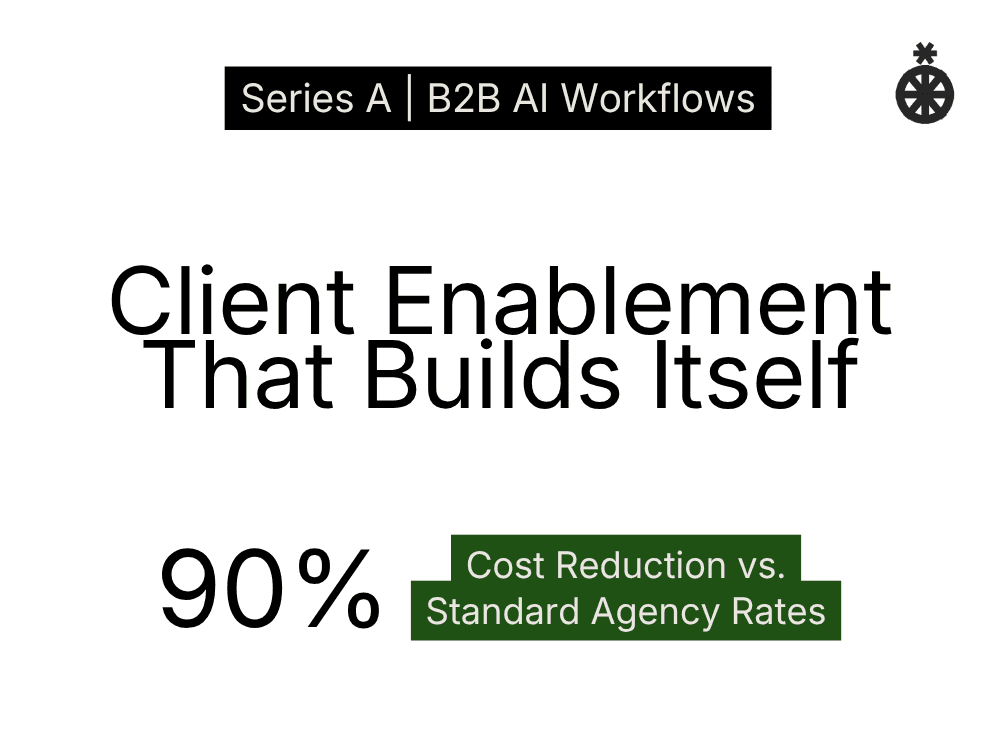
Our client is a fast-growing Series A, AI startup, who needed help building a self-serve enablement academy for their growing enterprise clientele.
The Challenge
Our client is a fast-growing Series A, AI startup whose no-code platform automates workflows in high-stakes enterprise verticals. As the product matured and the client base expanded across financial services, real estate, and insurance, a critical gap emerged: there was no structured enablement program to onboard new users, train builders, or support enterprise adoption at scale.
Enterprise clients were getting access to a powerful platform with five core toolsets (agents, knowledge, chat rooms, skills, and integrations), but the learning curve was steep. Platform knowledge lived in scattered Loom recordings, ad-hoc Slack threads, and one-off client sessions. There was no centralized, structured curriculum that could scale across accounts.
The Academy needed to be:
Comprehensive: covering the full platform lifecycle from "What is this platform?" to token optimization and multi-agent governance
Structured: organized into clear learning stages with role-based targeting
Dual-format: each lesson needed both a written reference (for the Notion database) and a video demo script (for Loom recordings)
Consistent: every lesson needed the same tone, terminology, formatting, and quality bar
Scalable: new lessons needed to be producible quickly as the product evolved
Building 28+ lessons manually (each requiring a write-up, video script, proper terminology, real-world examples, and Notion database metadata) would have taken weeks of dedicated content work.
The Approach: System First, Content Second
Rather than writing lessons one at a time, the build started with designing a repeatable production system, a set of instruction documents, reference materials, and a Claude Code skill that could produce lessons at consistent quality and speed.
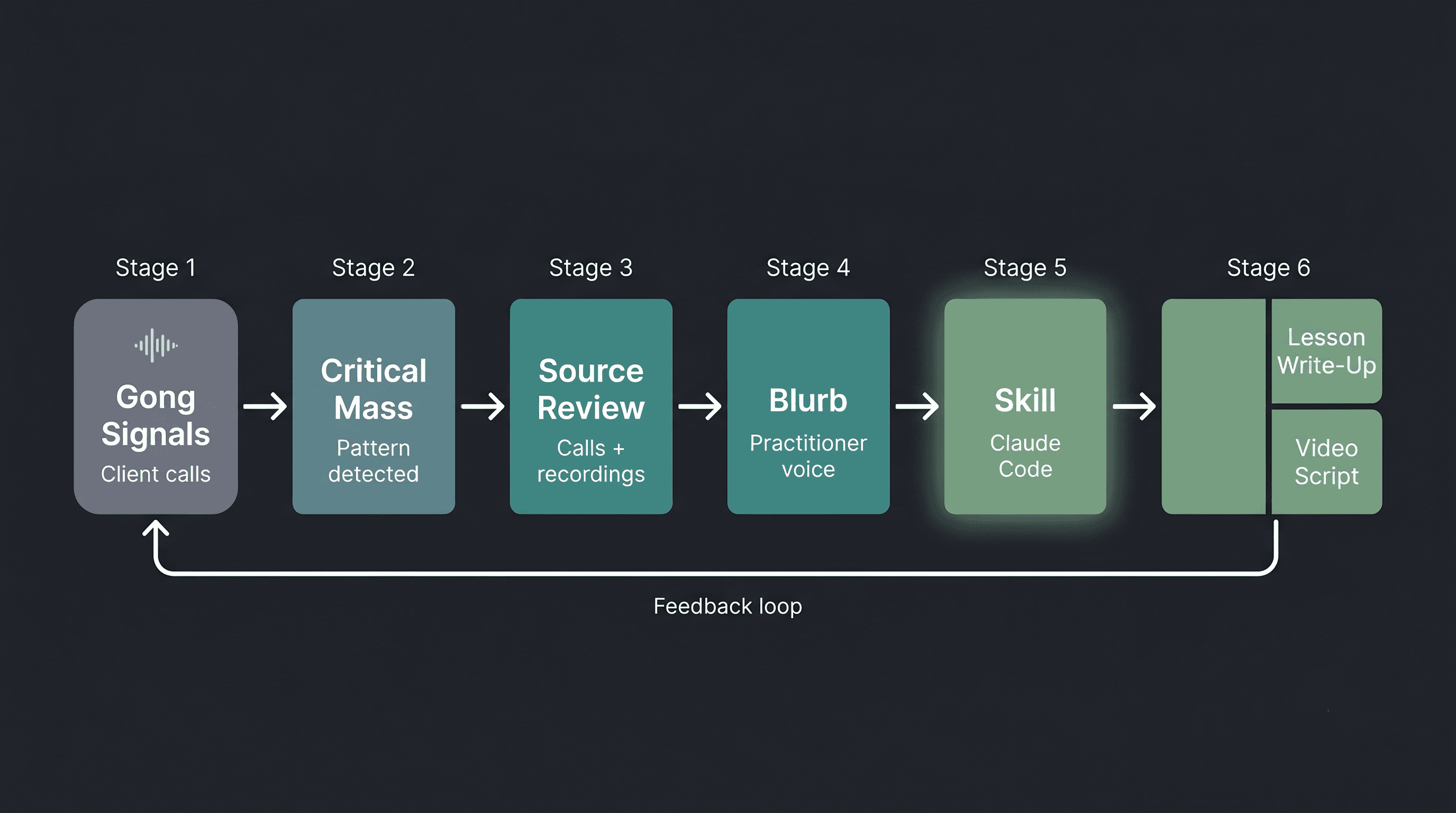
The system was equally about sourcing the right content in the first place. We built automations that reviewed client calls from Gong, tracked recurring questions and friction points, and surfaced signals for what the Academy should cover next. The curriculum wasn't designed in a vacuum — it was directly informed by the problems clients were actually hitting.
On top of that, we conducted multiple structured interviews with our Solutions Engineering lead and the Account Management / GTM lead to capture how clients actually use the platform day-to-day — the patterns they follow, the mistakes they make, the moments where they get stuck. These interviews informed both the structure of the Academy (what learning stages to create, how to sequence lessons) and the voice of the content (how to explain concepts in the way practitioners think about them, not the way product documentation describes them).
Phase 1: Build the Foundation
The first phase established the core infrastructure:
Instruction Documents Created:
Lesson Plan Write-Up Instructions The authoritative guide for how every lesson should be structured. Defined the 7-part standard lesson format (Title, Overview, Core Content, Video Embed, Tips, Key Takeaway, Next Lesson), three alternate formats (Let's Build, Worksheet/Checklist, Reference Guide), formatting conventions, terminology rules, and a quality checklist.
Video Demo Script Instructions Companion guide for video scripts. Defined the 5-section script structure (Introduction, Feature Overview, Step-by-Step Walkthrough, Recap, Close), VO/on-screen action formatting, timestamp conventions, and content guidelines.
Claude Code Skill Created:
lesson-builder: A 9-step automated workflow that takes a topic or content blurb and produces both a lesson write-up and video script. The skill handles input detection (short topic vs. detailed blurb), discovery questions for underspecified topics, file collision checks, content generation against the instruction templates, database property suggestions, and output summaries.
Source Material Ingested:
Loom transcripts from the product team explaining features and walkthroughs — including a decision tree recording covering when to use each platform toolset. These became the reference material for early lessons covering the toolkit and platform navigation.
Phase 2: Build the Reference Layer and Curriculum Outline
The second phase added the knowledge base and critically, an outline-format curriculum plan that mapped the core lessons we'd need to produce at launch. The goal was to identify the MVP set of lessons that would get clients from zero to building on their own, so we could prioritize what to produce first and batch-produce lessons efficiently with the skill later.
Product Guide A comprehensive product reference document covering all of the mission critical parts of building on the platform. From agent building, to security and compliance, to integration does and dont’s.
This document became the single source of truth that the skill references before generating any content. Ensuring every lesson uses accurate terminology, real proof points, and correct product descriptions.
Lesson Index: An outline-format catalog of all planned lessons with 2-sentence descriptions, organized by learning stage. This served three purposes: a curriculum planning tool to identify the MVP launch set, a deduplication check the skill reads before creating new content, and a sequencing guide to ensure lessons build on each other in the right order.
Skill Enhancement: The lesson-builder skill was updated to read the Product Guide and Lesson Index before generating content, and to fetch up to 3 related lessons from Notion for context and consistency.
Phase 3: Produce Content at Scale
With the system in place and the MVP curriculum outlined, we started producing lessons like clockwork, each including a full lesson write-up and a companion video demo script:
Lesson | Source Material | Write-Up | Video Script |
|---|---|---|---|
Skills in the Platform | Product Guide + Lesson Index | 145 lines | 127 lines |
Integrations — Actions & Triggers | Loom transcript (Using Integrations) | 171 lines | 157 lines |
Token Reports | Loom transcript (Token Reports demo) | 138 lines | 111 lines |
What is the Platform? | Product Guide (full platform overview) | 143 lines | 138 lines |
The first batch of lessons was produced in a single 3 hour session, roughly one lesson every 45 minutes including review cycles. This validated the system and set the pace for ongoing production.
What Was Built
The Full Curriculum (43 Lessons and Growing)
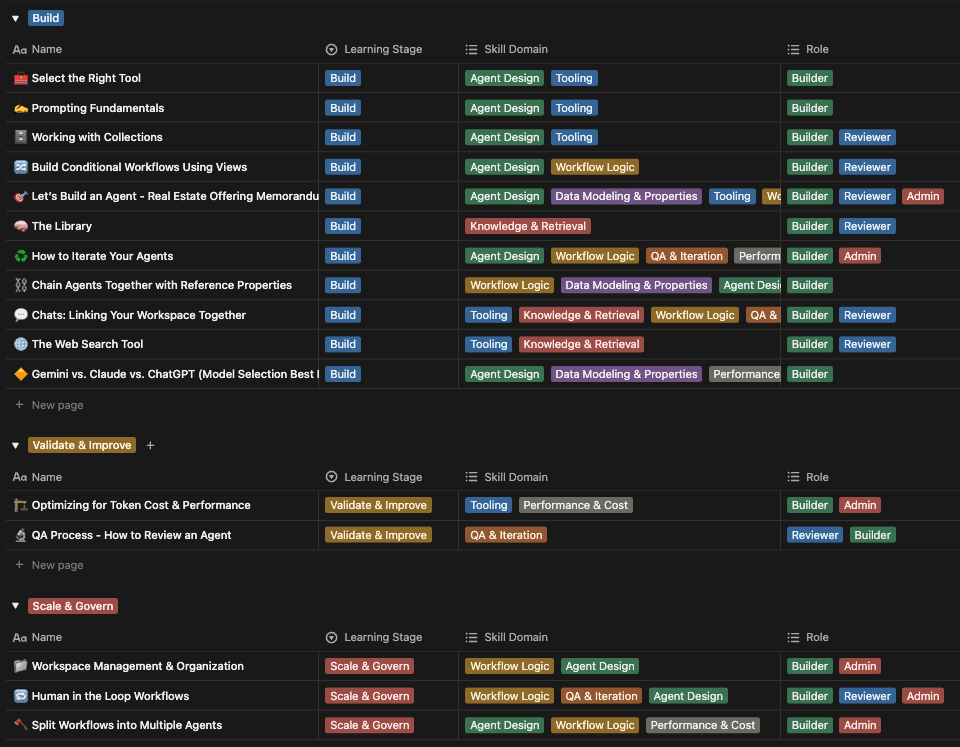
The Academy launched with 28 lessons across four learning stages. Since launch, an additional 15 lessons have been produced (5 each for the Build, Validate & Improve, and Scale & Govern stages) bringing the total to 43 lessons. The curriculum continues to grow as new platform features ship and client signals surface new gaps.
The Academy originally lived in Notion as a structured database. It has since migrated to the client's website, where it's publicly accessible to clients and prospects.
Foundations (10 lessons): Conceptual understanding of the platform
Build (17 lessons): Hands-on skills for using features and tools
Validate & Improve (7 lessons): QA, iteration, optimization
Scale & Govern (9 lessons): Enterprise patterns and governance
The Production System
Component | Purpose | Size |
|---|---|---|
Lesson Plan Write-Up Instructions | Structural template for all written lessons | 320 lines |
Video Demo Script Instructions | Structural template for all video scripts | 200 lines |
Product Guide | Source-of-truth product reference | 497 lines |
Lesson Index | Curriculum catalog and deduplication check | 104 lines |
| Automated lesson production workflow | 183 lines |
Content Produced Through Claude Code
Output Type | Count | Details |
|---|---|---|
Lesson Write-Ups | 43 | Full lesson pages (500–1500 words each), now hosted on the client's website |
Video Demo Scripts | 42 | Timestamped, VO + on-screen action format (3–8 min each) |
Loom/Gong Transcript Ingestions | 1,000+ | Product team recordings and client call insights converted to lesson source material |
Product Guide | 1 | 13-section comprehensive reference (497 lines) |
How the System Works
The Academy operates as a closed-loop system, from client signal detection through content production to publishing:
Step 1: Signal Detection
Automations review Gong call recordings and track recurring client questions, friction points, and feature confusion across the account base.
These signals are categorized and accumulated over time.
When a critical mass of signals emerges around a single topic (multiple clients asking the same questions, hitting the same walls, or misunderstanding the same features) the system flags it as a candidate for a new Academy lesson.
Step 2: Source Material Review
Once a lesson topic is triggered, we review the accumulated client questions, Gong call excerpts, and any related Loom recordings from the product team.
This ensures the lesson addresses the actual problems clients are facing, not hypothetical ones.
Step 3: Blurb Creation
After reviewing the source material, the lesson creator provides a content blurb, a short summary that captures our perspective on how to structure the lesson, what to emphasize, what common misconceptions to address, and how the topic connects to broader platform usage.
This blurb injects the practitioner voice into the production process, ensuring the output reflects real-world usage patterns rather than generic product documentation.
Step 4: Skill Invocation
The lesson-builder skill executes a multi-step workflow:
Load the Product Guide, Lesson Index, and both instruction documents
Review the Lesson Index and identify up to 3 related lessons
Fetch those related lessons for context and consistency
Detect input mode (detailed blurb vs. short topic)
If short topic: ask targeted discovery questions about the feature, audience, use cases, and components
Generate the lesson write-up following the Lesson Plan instructions
Generate the video demo script following the Video Demo instructions
Suggest database properties (Learning Stage, Role, Skill Domain)
Step 5: Dual Output
Every skill invocation produces two files:
A structured lesson write-up ready for publishing
A timestamped video demo script for recording a Loom walkthrough
Step 6: Publishing
Lessons are published to the Academy on the client's website with structured metadata:
Learning Stage: Foundations / Build / Validate & Improve / Scale & Govern
Role: Builder / Reviewer / Admin
Skill Domain: Agent Design / Data Modeling & Properties / Tooling / Workflow Logic / Knowledge & Retrieval / QA & Iteration / Performance & Cost
Design Decisions
Why System-First?
The core bet was that investing time upfront in instruction documents and a reusable skill would pay off exponentially as the curriculum grew. Writing each lesson from scratch would have introduced inconsistency in tone, terminology, structure, and quality across 28 lessons.
The system approach meant:
Any lesson could be produced in under an hour including review
Terminology was always accurate because the Product Guide was loaded as context
No lesson duplicated existing content because the Lesson Index was checked first
Related lessons informed new content because up to 3 were fetched from Notion
Quality was consistent because the instruction templates enforced structure
Why Loom Transcripts and Gong Calls as Source Material?
Product knowledge at the company often lived in two places: informal Loom recordings (a product manager walking through a feature, a demo to a client, an internal update) and Gong call recordings (real client conversations surfacing questions, confusion, and use-case discovery in real time).
Loom recordings contained the richest, most current product knowledge but were inaccessible as training material in their raw form. Gong calls provided direct evidence of where clients struggled, what they asked repeatedly, and which concepts needed better explanation.
By transcribing both sources and feeding them into the lesson skill, the Academy converted ephemeral product knowledge and live client signals into structured, searchable, reusable enablement content. The Gong pipeline in particular created a feedback loop: client friction surfaced lesson topics, and the resulting lessons reduced that friction for future clients.
Why Dual-Format Output?
Enterprise enablement requires multiple modalities. Some users prefer reading; others prefer video. The dual-format approach ensured:
Written lessons serve as reference material users return to
Video scripts enable consistent, high-quality recordings
Both formats cover the same content, reinforcing learning through repetition
The video script's VO + on-screen action format makes recording straightforward
The Results
Metric | Result | Context |
|---|---|---|
Client time-to-first-build | 33% reduction (48 → 32 days) | New users reach their first independent agent build significantly faster with structured Academy access |
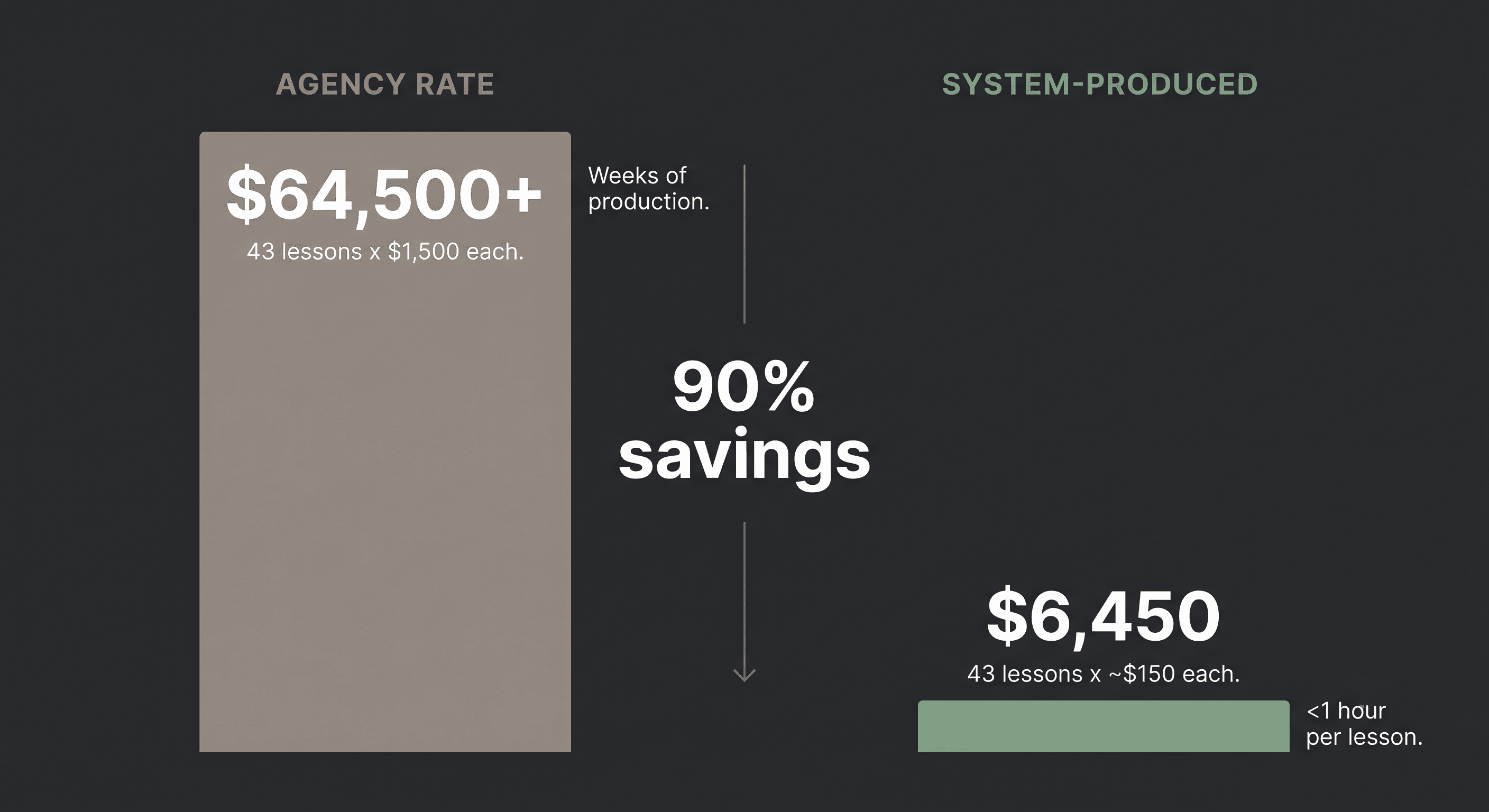
Total lessons produced | 43 in <50 total hours | ~1 hour per lesson including video recording and editing, at ~$150/lesson vs. $1,500+ industry benchmark for enterprise enablement content |
Curriculum sourced from client signals | 100% | Every lesson topic originated from recurring friction points surfaced through Gong call analysis — zero lessons built on assumption |
Production
43 lessons produced and published across four learning stages (and growing)
~40,000+ lines of instructional content generated (lesson write-ups + video scripts)
~1,120 lines of system infrastructure (instructions, product guide, index, skill)
~$6,450 total production cost (43 lessons x ~$150/hr) vs. an estimated $64,500–$77,400 at agency rates (43 lessons x $1,500–$1,800 each) — a 90% cost reduction
1 evening to go from zero system to three complete lessons
28 → 43 lessons in ongoing production, with 15 additional lessons added post-launch across Build, Validate & Improve, and Scale & Govern
Impact
Consistent quality: Every lesson follows the same structure, uses accurate platform terminology, and includes real-world vertical examples
Client-signal driven: Lesson topics are sourced directly from recurring client friction points via Gong call analysis, ensuring the Academy addresses real problems rather than theoretical ones
Scalable production: New lessons can be produced by invoking the skill with a topic name or source material, with no need to re-explain format, tone, or terminology
Living system: As the platform evolves (new features, updated terminology, new verticals), the Product Guide and Lesson Index are updated once and all future lessons automatically reflect the changes
Cross-referenced curriculum: The skill fetches related lessons before generating, ensuring natural sequencing and avoiding content overlap
Publicly accessible: The Academy has migrated from Notion to the client's website, making it available to clients and prospects without login barriers
Key Takeaways
Build the machine before building the output. The upfront investment in instruction documents, the product guide, and the skill saved dramatically more time than it cost, and ensured consistency across all 43 lessons and counting.
Let client signals drive the curriculum. The Gong call automation and signal-tracking pipeline ensured every lesson addressed a real problem clients were hitting. The Academy was a direct response to friction in the field.
Practitioner interviews shape the voice. Structured interviews with the SE lead and AM/GTM lead captured how clients actually think about the platform, not how product documentation describes it. This made the difference between lessons that read like help docs and lessons that read like a colleague explaining something.
Claude Code skills turn one-off work into repeatable processes. The
lesson-builderskill transformed lesson creation from a multi-hour writing exercise into a 45-minute production cycle with built-in quality controls.Dual-format output compounds value. Producing both a written lesson and a video script from the same source material doubled the enablement surface area with minimal additional effort.
System infrastructure compounds. The Product Guide, Lesson Index, and instruction templates don't just serve the skill, they serve anyone who needs to understand the platform's capabilities, create training content, or build client materials. The system is useful beyond its original purpose.