
Article
How to Build Simple and Scalable Notion Workspaces
At it’s core I look at Notion as a way to optimize the flow of information across an organization.
In a more abstract way, I think of Notion as the central node in a larger system.

Do you remember what you did when you first discovered Notion?
Did you run through dozens of templates in the marketplace trying to find the perfect one for your use case? Or did you stare at the empty page for way too belong before getting discouraged and saying this tool is dumb?
These are pretty common problems. They both have names — Shiny New Toy Syndrome, and Blank Page Syndrome (A.K.A. Writer’s block).
Most people and businesses I’ve worked with have run into one or both of these problems when they’re first starting out in Notion.
Maybe it’s worth reconsidering the common approach and starting from a place of proven success. One that starts by understanding the foundations that make up great Notion systems, and building on top of those with purpose.
How I View Notion
At it’s core I look at Notion as a way to optimize the flow of information across an organization.
That can be an organization of one, like a solopreneuer or a student. It can be an startup of 100 people, or it can be an enterprise business of 10,000+ that's using it across multiple teams.
In a more abstract way, I think of Notion as the central node in a larger system.
One that gives you access to all the other stops in the system.
Node - “A point at which lines or pathways intersect or branch; a central or connecting point.”
Notion should be the central point of information shared across your organization. Providing access to company knowledge and information within Notion itself, while also connecting to all the other relevant tools and platforms used by you or your business.
Built on top of a system that is simple, scalable, and purposeful.
Foundations of the Philosophy
Notion’s power is in it’s flexibility. It let’s you build systems and tools, block by block.
In theory you can build crazy in depth systems with formulas that trigger automations, dashboards that scroll for miles, and use custom pages for every employee.
But in practice something like that is quickly abandoned by the people who have to use it everyday. It’s overkill, and most people take the simplest path possible to get what they need.
So what principles do I follow when designing workspaces, to make sure people are actually using and getting value out of them?
The Key Principles for Every Workspace
Having worked across multiple industries and organizations to build business workflows, there are 3 bedrock principles at the foundation of all my Notion builds:
Simplicity → The workspace needs to be easily accessible, quickly understood by the end users, and should be intuitive to use with a low learning curve.
Scalability → The system needs to be designed with solid UX foundations using Dashboards and Databases, have repeatable processes and functions, and be easily searchable.
Purpose → The workspace should serve a clear and straightforward purpose, that provides value for everyone using it. The information and data inside of it needs to be actionable, and integrated with other systems & processes in the organization.
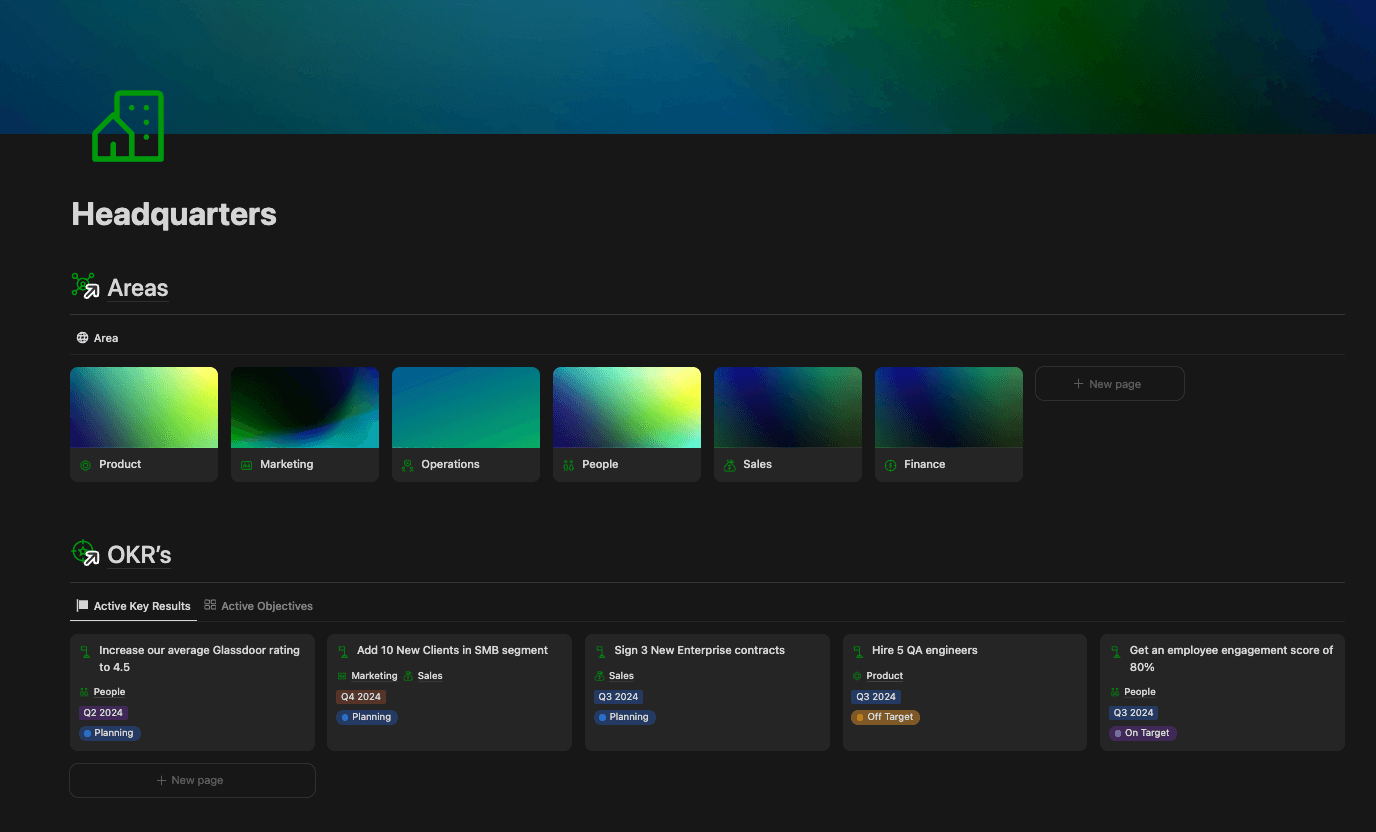
The headquarters of a startup's Notion workspace.
That doesn’t mean that you can only build top-line dashboards, with minimalist backends that don’t actually help you get things done.
It doesn’t mean you can’t build a complex operating system with all those formulas and automations.
It does mean that you need to design intuitive and straightforward user experiences on top of those backends, so that people actually use the systems.
The over arching principle we follow here is called Galls Law.
Galls Law - “Complex systems need to be built on top of already proven simpler systems.”
Avoiding Complexity
How should you go about setting up these simple foundational systems in Notion then?
We start from a baseline structure called DDP → Databases, Dashboards, Pages. Think of it kind of like going to a restaurant.
Dashboards → The menu, giving you a high-level view of all the options that are available, and guiding the customer’s experience. These top-level pages aggregate your different databases, and filter information to only the most necessary and relevant parts for quick access.
Database → The kitchen, where all the raw materials (ingredients) are organized and prepared. Databases are where all of the magic happens in Notion, allowing you to organize, sort, assign, and slice your information any way you can think of to build your perfect system.
Pages → The dishes served to the customers — specific, curated results that meet their individual needs. Pages are the places where the actual work gets done. Each page contains only the critical details and tools needed to get the task or job done.
At the core of the DDP structure is a user experience design concept called progressive disclosure. Basically, progressive disclosure means that you gradually reveal information to users as they interact with a product at different levels, making it easier to learn and use over time.
In practice with the system, the further down the funnel you go, the more information becomes available.
Databases sort info based on type or team;
Dashboards only show filtered, high-level information overviews;
Database pages and properties collect and organize that info on an individual level;
The blocks within the pages outline all the bottom-line info to make them actionable.
If we made every property available on those dashboards, nobody would actually use them. And if only top-line information was available in our pages, nobody would get anything useful done.

Visualizing how progressive disclosure works in practice.
The last key principle I implement in every workspace is the 3 Click Rule.
It’s the idea that you should be able to reach all of the information you have access to in Notion within 3 clicks, no matter where you currently are in the Workspace.
This puts navigation and usability top of mind every single time you open the app.
In practice this requires a very thorough process audit and roadmap before we do any building in Notion. Having a super clear understanding of both the strategic goals and the nitty gritty operations for a workspace are mission critical steps to implementing 3CR.
Design for Scale, Build with Purpose — The AIO Process
If you want to design systems that can scale with an organization, you need to do a good bit of upfront planning.
Organizations often don't realize they need a structured operating system until they're suddenly hit with a triggering event.
Something like onboarding multiple new employees across different teams at the same time, or the sales team achieving more than double their target for the quarter, and all of a sudden you have to service a lot more clients than you were prepared for.
But then your Notion workspace can't keep up, and no one has time to fix it.
Adding more templates just papers over the cracks instead of dealing with the real problem.
New employees struggle with onboarding because resources are scattered and standards vary across teams. Half of those new clients have a poor experience with your product because you haven’t outlined a consistent servicing process.
This ripples through the organization, hurting productivity—especially when teams need to work together across functions.
Balanced Growth — Consistency & Flexibility
A successful Notion workspace that’s built for scale strikes a balance between consistent frameworks and the flexibility to adapt to changing requirements.
It needs to have enough structure in place that users can intuitively navigate and contribute to the system, while being flexible enough to evolve with the constantly changing demands of a modern business.
Consistency: Implement uniform naming conventions, navigation paths, and page layouts to reduce confusion and improve user experience
Flexibility: Allow room for experimentation and iterative changes without compromising the foundational design.
Use progressive disclosure to reveal complexity only when necessary, keeping high-level views clean and actionable.
Your Notion system should never be static. Adopting a growth mindset in your Notion workspace design means viewing your system as a living, evolving entity.
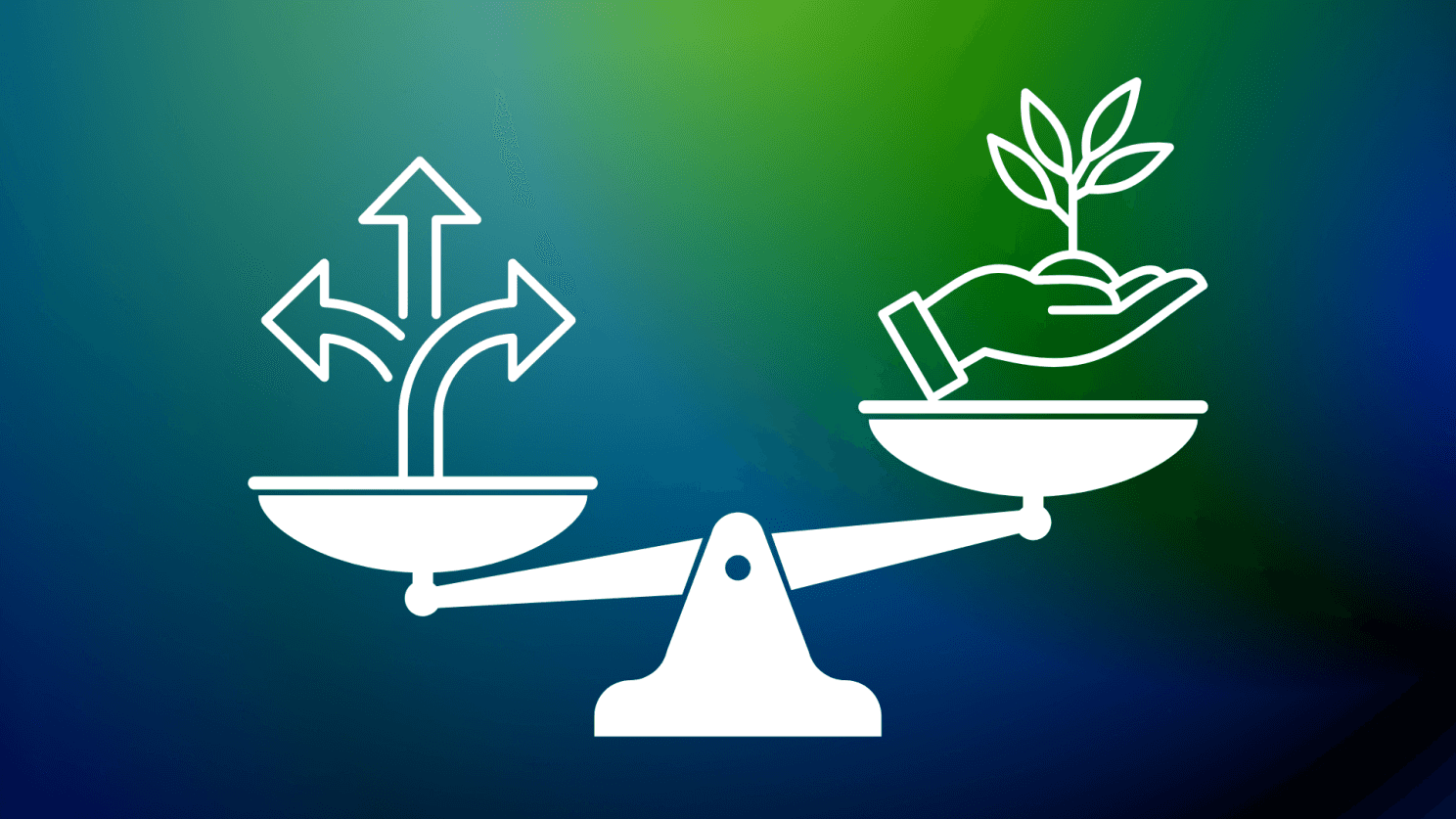
Balance flexibility and consistency.
So how do we actually go about designing and building out these Notion workspaces from start to finish? Using a three stage process called AIO - Audit, Implement, Optimize.
Audit → Measure Twice, Cut Once
My dad is a contractor, and one of his favorite sayings is “measure twice, cut once.” I think it applies really nicely when designing Notion systems.
Kick every workspace project off with a comprehensive workflow audit. Clarify the organization’s operational goals, and outline the most important systems you’ll need to build out.
Split the Audit into 4 sections:
Business Overview → Covers the purpose of your workspace and the goals you’re trying to achieve, your industry specifics, current team hierarchy & setup, the technical infrastructure (teamspaces, content, task & project management, databases, dashboards, pages, etc.), and your data security practices.
Workflow Review → Covers your current workflows and their associated pain points, methods of communication & collaboration in your team, how you handle measurement & reporting, and any integrations & automations we’ll need to setup.
Change Management → Review the user interface and user experience design of the system, the adoption practices and onboarding procedures for the team, and a general assessment to understand how the team has done with previous new system roll-outs.
Future Planning → Outline the companies plans for growth, the future scalability and next steps we’ve identified for the system, and discuss training and ongoing support for those next steps.
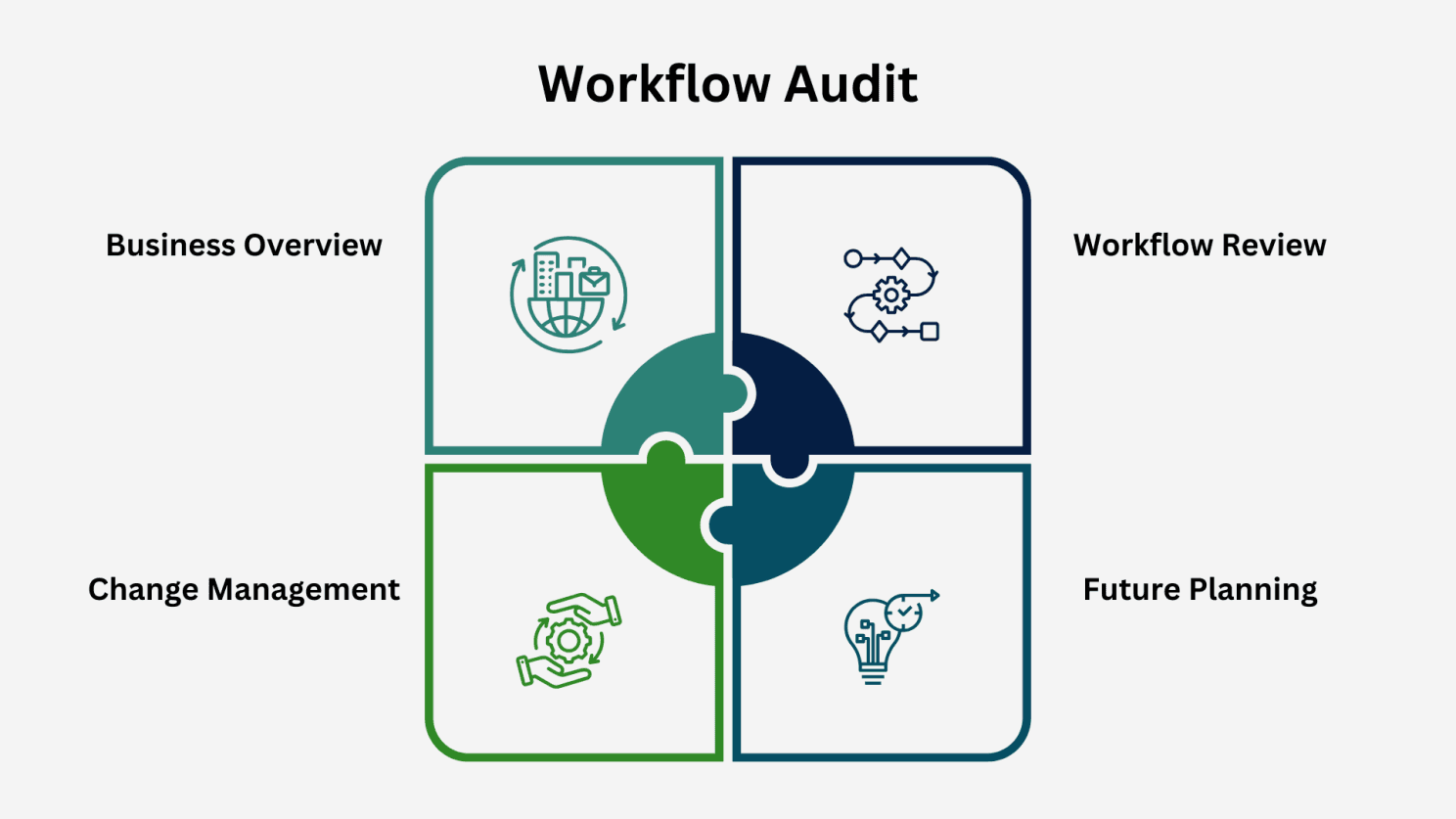
The 4 stages of our workflow audit - business overview, workflow review, change management, and future planning.
Implement → The Structure of a Workspace
The core structure of the workspace revolves around the DDP framework — Databases, Dashboards, and Pages — that we reviewed before.
Dashboards are a way to aggregate and filter information that lives in databases.
They give you an overview of the most relevant and actionable information in your system.
You can effectively organize dashboards into one of three categories depending on what user persona you’re trying to engage:
Organizational → Built for the entire organization to present information relevant for everyone in the business. Examples include a company Headquarters or Home page that shows the main business areas, OKRs, ongoing projects, and announcements; A company Wiki could also be considered an Organizational dashboard.
Team → Built for specific teams like Sales, Legal or HR to present information that those teams can action. For example a Sales team dashboard would have Sales Target KPI’s and OKRs and their progress, meeting notes, team documents/SOPs, and team specific announcements.
Individual → Built with the individual user in mind, these dashboards only show information that is specific or directly linked to single users and their team. They are highly actionable by nature and typically include things like Tasks, Projects, their Meetings & Meeting Notes, as well as Documents related to their team.
The best way to build dashboards that are purposeful and scalable is to use linked database views, filtered to fit that dashboards needs.
This let’s you have a simple and straightforward front-end user experience, built on top of a strong, and structured back-end system using databases.
Databases in Notion let you aggregate information across multiple pages, and organize them using common properties.
In my systems, databases can be organized into three different types:
Hierarchy → The top levels of information and work that sort and organize actionable info. Includes Projects, OKR’s, and Accounts.
Contextual → Information that adds additional context to Actionable and Hierarchy data. Includes Teams, Tools, and the Inbox.
Actionable → Smallest units of work that enable the team to take action. Examples include Tasks, Notes, and Meetings.
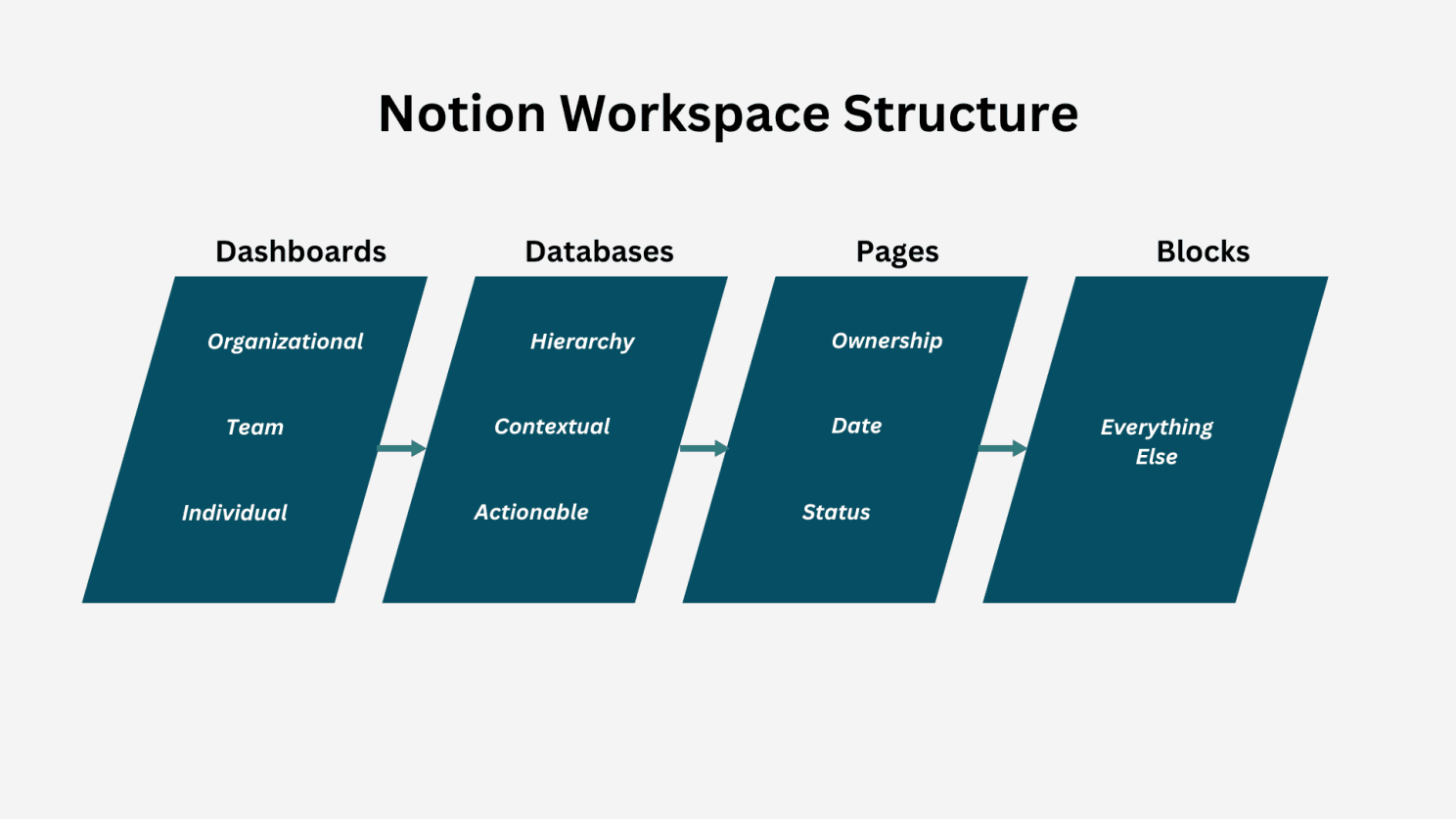
The structure of a typical Notion workspace.
The real power comes out when you start using properties to connect pages across the different databases, as well as to external tools and data sources.
For example you could set your system up so that:
Meetings can be linked to Areas, Projects, or to both.
You can assign Tasks to Projects, or directly as action items on Meetings or OKRs.
You can add some context to Meetings by linking them to Accounts.
Then you can link Zoom recordings, Miro whiteboards, and connect more Tools to provide the full story of the discussion, all from the one meeting note.
The blocks within the page contain the content all of that pages relevant content — where the real actionable info is documented.
These can be simple lines of text, with markdown formatting or bullet points, to documents like embedded PDF’s or Loom videos linked directly in the block.
There are thousands of possible combinations of page blocks you can play with — but as always, I recommend keeping it simple.
Optimize → Learn and Adjust
Just like your business, your workspace will encounter new challenges and opportunities as it grows. Continuous iteration ensures that the workspace remains aligned with your goals, adapts to your team’s changing needs, and evolves alongside your business processes.
Remember Galls Law: Complex systems need to be built on top of already proven simpler systems.
With simpler systems and foundations in place, you can start to figure out how to build out some more bespoke pieces. Start by:
Iterating Regularly: Schedule periodic reviews to assess what’s working and what isn’t.
Encouraging Feedback: Involve team members in the refinement process to ensure the workspace meets everyone’s needs.
Testing New Ideas: Experiment with new features or layouts in a sandbox environment before rolling them out broadly.
Creating a Change Log: Keep running documentation that outlines the changes made to the workspace.
Your workspace becomes a living ecosystem over time, constantly evolving with the needs of your business, and the inputs you’re providing the system.
Top 10 Tips for Designing Your Notion Workspace
Start Simple → Build on proven simple systems like Databases, Dashboards, and Pages (DDP). Use Galls Law: Begin with a the simplest solid foundation and scale as needed.
Prioritize Your “North Star” Goals → Anchor your workspace design around the top two or three objectives for your team or organization. Align every database, dashboard, and page with these overarching goals.
Keep the User Experience Front and Center → Prioritize ease of use with intuitive layouts and low learning curves. Avoid overwhelming users with too many details upfront—reveal them as needed.
Optimize for Actionability → Ensure all data in the workspace serves a clear purpose. Make information actionable with properties like ownership, date, and status.
Keep User Personas in Mind → Identify key user personas (e.g., managers, team members, clients) and tailor sections of the workspace to their specific needs. Use persona-based dashboards to deliver relevant insights for each group.
Balance Consistency and Flexibility → Standardize naming conventions, layouts, and navigation paths for consistency. Allow room for iterative changes to adapt to new requirements.
Document Changes and Processes → Maintain a changelog to track workspace updates and decisions. Provide clear documentation or tutorials to guide users on new features.
Use Color and Visual Hierarchy Strategically → Apply colors sparingly to indicate priorities or statuses. Use headings, dividers, and icons to guide users’ attention to key sections.
Plan for Onboarding and Training → Include a dedicated onboarding page or guide for new users to familiarize themselves with the workspace. Provide walkthrough videos or FAQs to reduce learning curves.
Utilize Templates as Building Blocks → Create reusable page templates for recurring projects or tasks. Include pre-filled properties and step-by-step instructions to save time and ensure consistency.
Simple Scales.
In a world where complexity often leads to confusion, the key to building systems that last is to embrace simplicity.
With clear objectives and scalable structures, you can create an environment that grows alongside your business without becoming overwhelming.
At the end of the day, the hallmark of a great Notion workspace is its ability to adapt to changing needs while maintaining clarity and purpose.
When designed thoughtfully, it becomes a system that not only supports your current workflows but also evolves seamlessly as your team, processes, and objectives change.
Simplicity scales because it prioritizes clarity over complexity. So that your team can navigate the workspace effortlessly, access the right information at the right time, and focus on what matters most.
Remember, the best systems aren’t built in a day—they’re nurtured, iterated, and refined over time.
Stick to the fundamentals, engage your team in the process, and focus on purposeful simplicity.
With this foundation, your Notion workspace will become more than a tool — it becomes the backbone of your team’s efficiency.
I’m Mike - a systems builder and AI expert.
I help businesses manage and optimize their operations with simple, scalable, and connected systems.
If you're looking for help getting started with AI or optimizing your Notion workspace, I'd love to chat!